
Use the Vehicle Log to compare cars within the same job. Check entry and tracker status with WAiNK, then confirm registration on the Personal map index before trusting a trunk with loot.
Start with the Tsunami Zorrusso or Mojito Tempesta for a fast road car. For hauling bags, check trunk space and registration first. Jason starts with the '70 Vapid Ganado. In Chapter 2, Moses lets Lucia register an eligible car for free. Dexerto's in-game Vehicle Log comparison, PowerPyx's Moses walkthrough
Vehicles worth comparing
| Job | Vehicles to check | What to look at before committing |
|---|---|---|
| Fast paved routes | Tsunami Zorrusso, Mojito Tempesta, Pegassi Vitello | Straight-line performance helps on a highway. Check acceleration and asphalt handling for a route with intersections. The first two entries are named Street Racer variants. |
| A sports car for frequent city driving | Pfister Comet S2, Grotti Itali RSX, '97 Maibatsu Penumbra FF | Try a few turns in traffic and check the intended character's ability to register the car. The Penumbra has an early fixed location. |
| Muscle car for road driving | Bravado Gauntlet Hellfire, Vapid Dominator ASP, Vapid Dominator GT | Look for the exact year and variant on the vehicle card. A high speed stat means less if you're regularly braking for turns. |
| Dirt and deliveries | Smuggler Caracara, Black Moth Kamacho, Vapid Sandking XL | Compare off-road handling, then inspect the trunk or cargo interaction before bringing bags out. The Smuggler Caracara is a standout at Brooks Boatworks. |
| Quick runs on a bike | Nagasaki Carbon RS, Maibatsu Sanchez, Maibatsu Manchez | Pick for the surface and for whether the job requires you to carry items. Test access to storage before using a bike for a pickup. |
| A regular car already in your name | Jason's Ganado, Lucia's first registered vehicle | The map tracks ownership, and a personal vehicle can be recovered after destruction. Use it when the trip involves your own weapons, outfits or bags. |
The Granforma Zorrusso is the base supercar. The Tsunami Zorrusso has its own Vehicle Log entry, with 32 out of 50 in Dexerto's sum of speed, acceleration, asphalt handling, off-road handling and strength. For a race, compare the first three scores. For a swamp route, start with off-road handling and strength. Boats and aircraft lack the same five ratings, so check their own catalog entries for the trip you have planned. Dexerto's ranking method, VGC's Brooks Boatworks walkthrough
Find the exact model without shopping blind
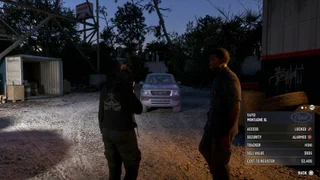
Read Access, Security and Tracker separately. The Montagne XL in Moses's yard is locked and alarmed, with no tracker. Moses walkthrough screenshot
Open the game's Vehicle Log to compare entries you've found. Keep the manufacturer, name, year and named variant together when using a location guide. If you're looking for a specific classic for a collector, check the request on the phone against the car name before driving across Leonida. Use the Wyman route for his hand-ins.
For a car you can see in the world, hold Up on the D-pad to use the phone's WAiNK scan. Read the entry requirement and the tracker line separately. When you need a car for a quick drive, start with one you can currently open. When you need a permanent car, look for a tracker status the current fence can handle. Before sending Lucia to Moses, see the early-car routes for a nearby pickup and the trip to Vespucci Island. GamesRadar's footage of WAiNK and the Key Cloner
Keep a car in Story Mode
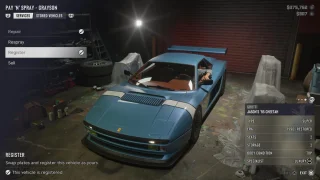
Check the garage transaction, then verify the car on the Personal map index.
- Chapter 1: Jason has the Ganado. Borrowed and stolen cars are useful for trips around the map, but check the Personal index before treating any of them as cars you can recover.
- Chapter 2: After Girl's Trip, take an eligible untracked vehicle to Moses in Port Gellhorn when the mission opens. Follow the respray and registration prompts. Use the free first registration on the car you want to keep for Lucia.
- More storage: Progress the story and check the Vice City Real Estate phone app for garages. A garage is a place to put an extra vehicle. The Personal map mark identifies the character's registered ride.
- Chapter 3: Randy opens another route for dealing with tracked cars. Use the Key Cloner guide to identify whether you can enter a car and which tracker cases the fence is ready to handle.
After the transaction, open the map with the touch pad on PS5 or View on Xbox. Find Personal in the index and match the marker to the car. The map can also remember the last unowned vehicle you drove. Read the category of the marker before you leave anything difficult to replace in the trunk. GTABase's personal vehicle guide, PowerPyx's registration guide
Get back a destroyed, missing or impounded car
| What happened | First check | Next action |
|---|---|---|
| Parked it and lost sight of it | Personal map index | Select the relevant character's personal vehicle and set a waypoint. If there is an unowned marker, check whether you were driving a different car. |
| Rolled it onto the roof or side | Approach it on foot | Hold Square on PS5 or X on Xbox if the shove prompt appears. Drive it out once the wheels are down. |
| Wrecked a registered vehicle | Destroyed marker | Call Joey in Contacts in Chapter 1. After Moses, open Scooter Bros, select the car and choose Request. Vehicle delivery controls |
| Arrested or wasted with the car nearby | Impound marker under Personal | Follow the map marker to the lot. Check nearby police vehicles for seized stash bags if the bags aren't in the recovered trunk. |
| Wrecked a borrowed car | Check if it was ever registered | Replace it. A destroyed unowned car lacks the personal-vehicle recovery option. |
| Still drives, but the engine is hurt | Check damage and fuel | Use a Pay 'n' Spray or mod shop for repairs. Gas stations can handle minor repairs. |
Recovering the car and recovering its cargo are separate jobs. Make a point of checking the trunk after an arrest or death, especially if you were using a temporary vehicle. Also inspect special parts on standout vehicles before replacing them at a shop. A part you remove from one of these vehicles can be lost. GTABase's recovery, impound and standout-vehicle rules
What to take on your next job
Check trunk capacity before accepting a job that gives you several bags. If you can keep a second car, use one slot for a paved-road run and the other for a vehicle you can load and control on dirt. For an expensive tracked car, check the fence's current options before using a garage slot on it.
Sources
Revision history
— Recently updated