
Randy installs the Key Cloner during Clonin' Keys, Makin' Gs. Scan the car with WAiNK, use Clone Key at the driver's door and follow the on-screen stick prompt until the progress meter fills.
Look for Steal the Zorrusso for Randy in Chapter 3. It starts Clonin' Keys, Makin' Gs, the mission in which Randy puts the Key Cloner on your phone and sends you to try it. If you've only just met Moses in Chapter 2, keep using the Slim Jim on compatible cars until Randy's job opens. A successful clone opens the car while any tracker stays active. PC Gamer's Chapter 3 Key Cloner walkthrough, GamesRadar's mission and app screenshots
Find the mission and check that the app is ready
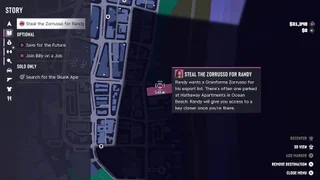
Select the Zorrusso objective in Chapter 3 to get Randy’s app.
At Randy's marker, follow the setup until Key Cloner appears on the phone. Continue to the marked Zorrusso and check the driver's door for Clone Key.
If the objective hasn't appeared, open the Story list and check the active tasks. If Randy's job is active, follow it through the Key Cloner installation. Before the app unlocks, WAiNK can show a car's security details, but the driver's door won't offer Clone Key. PC Gamer's mission name and unlock sequence, GamesRadar's map objective
Clone a key at the driver's door
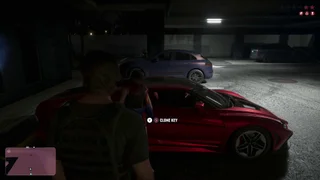
Use Clone Key at the driver’s door once Randy has installed the app.
- Identify the car from outside. Hold Up on the D-pad and aim the WAiNK scan at the vehicle. Read the entry requirement and the tracker status. When there are several closely parked cars, confirm the name on the card matches the one you're standing beside.
- Line up with the driver's door. Approach the side with the steering wheel. When Clone Key appears, press Triangle on PS5 or Y on Xbox.
- Sweep the stick on the minigame screen. Follow the stick symbol shown by the game. Move in a slow circle until the signal gets stronger or progress speeds up. Hold the direction that gives the strongest response and watch the meter. If progress slows, move a little in either direction to find the signal again.
- Let the action finish and get in. If the meter fills and the door unlocks, use the ordinary entry prompt. Once you're in control, press Up on the D-pad to see the car information and tracker status again before you decide where to drive it.
The whir and controller vibration help identify the strongest range. If vibration is off, use the change in progress on the screen. If the vehicle belongs to the mission, finish the marked objective after cloning the key. The mission handoff is what moves Randy's job along. GamesRadar's console prompts and scan view, PC Gamer's minigame explanation
Choose what to do with each tracker status
| What WAiNK or the vehicle card says | What you can do now | What to do if you're trying to keep it |
|---|---|---|
| No tracker | Follow the entry method on the scan. Eligibility still depends on which car and transaction you're using. | Early in Chapter 2, this is the category to look for when choosing a vehicle for Moses. |
| Standard Tracker | You can take the car once you've handled its entry requirement. Expect limits on modification while it remains tracked. | Once standard-tracker transactions open in Chapter 3, take an eligible car to Pay 'n' Spray and look for Register. Confirm the result on the map before putting items in the trunk. |
| Advanced Tracker | An unsecured car can report its location to police when you slow down. Cloning the key leaves the tracker in place. | Progress Randy's Wish List until his operation can handle the vehicle. Look for an actual transaction prompt. If the game still rejects it, take an eligible car instead. |
| A marked Randy delivery | Follow the mission objective and deliver the model Randy requested. | A hand-in completes his job. Register a different eligible car when the goal is to add it to your own collection. |
A Slim Jim, a Key Cloner and a fence solve different problems in this sequence. The first two get you inside the types of car listed on WAiNK. Registration is the transaction that makes a car personal. If you want a car for several missions and don't need a particular luxury model, check the tracker status first. Rockstar developer demonstration of vehicle security and WAiNK, GamesRadar's tracker examples
Unlock advanced-tracker removal later
Progress Randy's Wish List and finish Photo/Shoot in Chapter 4. The Story objective is Shoot a Promo. Wait for Randy's call asking for a Mamba GT, then deliver it. After he confirms the Pay 'n' Spray service is open, bring in an advanced-tracked car and look for the Register option. If you're still in Chapter 3 and the shop refuses an advanced-tracked car, you can continue with an eligible standard-tracker vehicle while you advance the story. The Mamba in Randy's route is its own objective, separate from the Wyman restoration hunt. Insider Gaming's advanced-tracker unlock
Why the prompt or the option is missing
The phone has the app, but the door shows another action. Scan the car. A car that accepts a Slim Jim can show its own entry action, while some cars simply open. If the card says it needs the cloner, move along the driver's side away from any nearby vehicle or environmental interaction, then line up at the door again.
The meter barely moves. Return the stick to center and start a slower sweep. Listen for the change in sound or watch the progress meter as you move. Hold at the angle where it makes steady progress.
Randy refuses my car even though I cloned it successfully. Read the tracker label from the driver's seat. Advanced Tracker eligibility depends on Wish List progress. Check the active objective too. A shop can accept the specific vehicle requested by the mission while declining a different high-end car you brought in yourself.
I parked the cloned car and can't find it. Check the last unowned vehicle marker and your Personal map index. If it was never registered and has disappeared or been destroyed, the recovery options for personal cars don't apply. Use the vehicle ownership and recovery guide to choose a car you can bring back.
Sources
Revision history
— Recently updated