
Hold Left on the D-pad to open the radio controls. Use the shoulder buttons or right stick to choose a station, or move down into On Demand for episodes and playlists.
Use the station dial for live music or talk. To pick an episode or play a playlist you've unlocked from posters, hold Left on the D-pad and tilt the right stick down to On Demand. For radio on foot, equip headphones or earbuds first. GamesRadar's radio and On Demand controls
Find a station by sound
Start with the dial if you want music in the background. For a particular episode or one of the poster playlists, open On Demand. You can sample some of the stations on Rockstar's music page. VGC's station list, Rockstar's station previews
| If you want | Try | How to pick between them |
|---|---|---|
| Pop or synths | Flash FM, Kaleidoscope FM, Vice City FM | Flash covers pop. Try Kaleidoscope for synth-pop, or Vice City FM for an '80s mix. |
| Guitars | V-Rock, The Chamber 106.6, Emotion 98.3 | Start at V-Rock for rock, then try The Chamber for heavier music or Emotion for ballads. |
| Rap, trap or R&B | Dirty South Classics, VCRR, Honey FM | Dirty South Classics is the rap option. Try VCRR for trap and Honey FM for R&B. |
| Dance music | Circoloco Records Radio, Stockyard FM, Worldwide FM | Circoloco skews toward underground house and techno. Stockyard suits a party-electronic set. Worldwide FM runs a house mix in the launch dial guide. |
| Latin and Caribbean music | Cocoteo FM, Radio La Ola, Radio On-U | Try Radio La Ola for salsa and Radio On-U for reggae. Cocoteo is another stop for Latin music. |
| Sounds from across Africa | Afrobank FM | Start here for the station's selection of African music. Rockstar offers an official preview. |
| Country, blues, jazz or classical | Back Country Radio, Gloriana Blues Radio, Leonida Jazz Radio, Symphony FM | Each station gives you a separate genre, so move between them if you're trying to place a track you heard. |
| Conversation and commentary | The Wipe, WKTT | Choose one of these for talk. Use On Demand when you want to select an episode yourself. |
To identify a particular song, note the station and look up the exact performer and track in the official GTA VI credits. Grand Theft Auto VI: The Album and the game's Original Score have their own track lists. Use Rockstar's music page for those releases and the station previews. Rockstar's album and listening information
Change station, switch it off or choose a specific episode
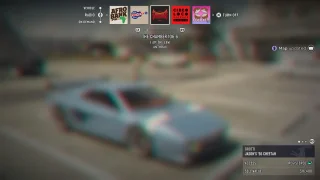
Hold Left to see the stations, then release it after making a selection.
| Goal | Action |
|---|---|
| Tune the current vehicle | Hold Left on the D-pad, move with the shoulder buttons or right stick, then release on the station. The same control applies to a usable radio in the world. |
| Turn the radio off | Open the radio menu and press Cross on PS5 or A on Xbox for its off command. Read the button label before pressing if you're already in a submenu. |
| Pick a podcast episode | Hold Left, tilt the right stick down into On Demand, select a show, then use Square / X to cycle episodes and Cross / A to play. |
| Pause and pick up later | Go back to the On Demand playback controls and pause the episode. Reopen the controls when you're ready to play from that point. |
An episode title on the screen usually means you're hearing On Demand. Pause it there before switching back to a live station. Use the on-screen button labels if you've changed your controller layout. GamesRadar's radio wheel and episode controls
If you're looking for a particular show, The Safe Trap, Vice City True Stories, Drunk Kings, Final Act and Fuck, Marry, Murder are available through the podcast menu. The Richard Bastion Show and Hit the Bricks are programs on WKTT. For Ask Dr. Nita or She Got Assets, tune The Wipe. Use the station when you remember the host and the episode menu when you want to choose a recording and resume it later. PC Gamer's talk radio and podcast listings
Listen on foot with headphones or earbuds
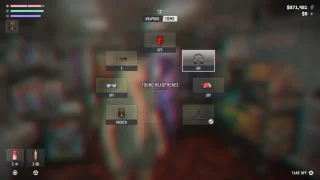
Equip the headphones through the items wheel before opening the radio on foot.
Open the in-game Index and use Style → Electronics to find a nearby store. Buy headphones or earbuds as the character who will use them. Jason and Lucia each need their own pair. Hold L1 / LB to open the loadout wheel, tab to items with R1 / RB, go to the headgear slot and equip them. The D-pad radio menu then works out of the vehicle.
If the controls work in the car but not on the sidewalk, check that the current character has the headset equipped in the items wheel. If it vanished after a fight, look on the ground before walking away. A blow can knock worn headphones off, and you're able to pick them back up while they're still there. GamesRadar's store and equipment walkthrough, Clothing and appearance guide
Scan the five posters for the two extra playlists
Use the phone's WAiNK scan on the posters. Four unlock The Sniper of La Perle, and one unlocks The Vault Radio. Once you finish a set, look for it under On Demand. PC Gamer's poster maps and pickup walkthrough
| Poster | How to find it |
|---|---|
| TWA Ponya Tattoo | Go through the entrance and look at the small table to the right. |
| Drip Drops | Look on the counter by its register. |
| Aunt Zola's Soul Food | Check the corkboard left of the entrance. |
| Jack of Hearts | After the Chapter 3 access, go upstairs to the recording studio. Find the poster by the fan in the control room. |
| The Vault | Head south from Crosstown toward Downtown Vice City. Inside the club, follow the entrance corridor and scan the poster on the back wall. |
The first three Sniper posters are near one another in La Perle and Crosstown. If you're still early in the story, you can collect those and return for the studio poster when Jack of Hearts opens. The Vault playlist uses its own poster. Check the On Demand list after the scan so you know which set the game credited.
Sources
Revision history
— Recently updated