
Use the active character's wardrobe to build a look and save up to ten outfits. Store up to five outfits in that character's personal vehicle for changes away from home.
Start at the safehouse wardrobe if the active character already owns the clothes. For new pieces, open Style on the map and find a clothing shop. Switch to the character you want to outfit before you buy or store anything. GTABase's wardrobe and vehicle outfit guide
Where to make each change
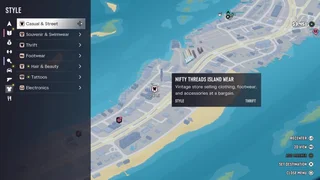
Use the Style category to find the right shop before making the trip.
| I want to... | Where to go | How to confirm it |
|---|---|---|
| Change into clothes I own | The active character's safehouse wardrobe | Equip the items or select an outfit. Leave the wardrobe and check the character's appearance. |
| Buy clothes or a complete outfit | A clothing retailer under Style on the map | Confirm the purchase as the character who will wear it and look for it in that character's wardrobe afterward. |
| Assemble and save a full look | The wardrobe | Choose individual pieces, then save the combination in a custom outfit slot. Select another outfit and switch back to check the saved combination. |
| Bring a change for later | The trunk of a personal vehicle | Add the outfit and reopen the trunk menu to check that it appears before leaving. |
| Change hair, facial hair or tattoos | A salon, barber or tattoo parlor listed in Style | Preview on the active character and confirm at the vendor when satisfied. |
| Equip sunglasses, headgear or headphones | L1 / LB for loadout, then R1 / RB to the items tab | Look in the relevant item slot. Purchased headphones have to be equipped before the radio works on foot. |
Jason is available for the early free-roam shopping trips. Once Coffee Break in Chapter 2 unlocks free switching, hold Right on the D-pad to choose Lucia or Jason. Visit the shop or wardrobe again as the character you are outfitting. A mission can briefly prescribe a different look. Check the wardrobe once you're back in free roam if the new appearance doesn't match what you were wearing before the scene. GTABase's Story Mode character switching and wardrobe controls, GTABase's outfit guide
Put together a first outfit without buying a full set
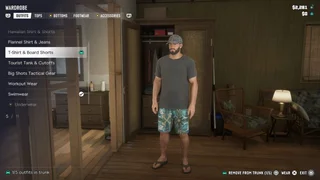
Build the outfit from separate pieces, then save it to an available slot.
At Jason's house in Key Lento, start with the clothes he already owns. Buy a single piece if the wardrobe gives you the rest of the look. Use Style on the map to find Nifty Threads Island Wear for thrift clothes, Key Lento Kahuna for summer wear, or Flip Flop House for shoes. Check the price in the store preview.
At the wardrobe, rotate with the right stick and zoom with R2 / RT. Move the focus up or down to inspect a different part of the outfit at close range. Save the combination in one of the wardrobe's ten outfit slots. Switch to another outfit and back to check that it saved. When Lucia has a registered car after Moses, open its trunk and store an appropriate change there. Jason can use his own personal car for the same kind of storage. The outfit's wardrobe slot lets you re-equip it at home, while its trunk entry makes it available on the road. GTABase's shop types, preview and outfit limits, How to register Lucia's first car
Change away from the safehouse
Use a changing room at a clothing shop or gym if you're in town and the safehouse is across the map. Look for the blue weight icon for a gym. From the wardrobe or changing room, add up to five outfits to the active character's registered car. Park and open its trunk to confirm the outfit is available. You can store up to three of each accessory type in the trunk alongside the outfits, so you have room for a spare hat or pair of glasses without replacing the clothing combination you've saved at home. Save a found accessory to the wardrobe before swapping the whole look if you want to keep it. GTABase's changing room, outfit storage and accessory controls
Accessories, hair and tattoos
Use the items tab for hats and glasses. For supported items, Up / Down on the D-pad changes how the piece is worn. Keep the accessories you want to reuse in the wardrobe and check the separate limits when adding them to a trunk. For headphones or earbuds, make the purchase at an Electronics store for each character who needs them. If you have equipped them, use the same radio controls you have in a car. A fight can knock them loose, so look nearby if they disappear from the item wheel. GTABase's accessories and storage rules, Radio and headphones guide
Use a salon for available hair changes and a tattoo shop for body art. Switch characters before opening the vendor menu if you're looking for the other character's selection. Jason's facial-hair options are also part of his appearance customization. Tattoos and hair are applied to the character through the shop preview. Use the wardrobe for the clothing saved alongside that look. GTABase's character customization overview, Previously's guide to the game's style
Check edition clothing and shops separately
Vice City Style, Sara's Unisex Salon, Stock 305 and Electric Fang Tattoo Parlor are part of the Ultimate Edition. The Vintage Vice City Pack gives you a separate set of clothes and hairstyles. Check the item against Rockstar's edition list before looking for it in your wardrobe or at a store. Once the city and the relevant shop are open, visit it as the character who can use the item. For content already granted to you, also check the active character's wardrobe. Rockstar's add-on and store details, Rockstar's platform, edition and add-on reference
If a cutscene leaves you wearing a different outfit, open the active character's wardrobe and reload the saved look. If it is missing only from the trunk, check whether you are in that character's Personal vehicle and whether you stored the outfit there. For a locked edition shop, check the installed add-on and the chapter you are in. Personal vehicle recovery and storage
Sources
Revision history
— Recently updated