
Open the Story list in the map index. In Chapter 2, check the $15,000 target in Prepare for Vice City and finish the required jobs. Wait for Cal's message and the motel marker before starting Checking Out.
Open the map index and select Story, marked by the pink book. Start with an objective already on that list. You can lose track of a mission when the map shows the action you need to take instead of the name you remember from the story recap. If you see Move to Vice City, for example, you are already looking at the lead-in to Checking Out.
Find the next action the game is waiting for
| What you see | What to do next | What confirms progress |
|---|---|---|
| A Story entry is listed but you don't remember it | Select it in the index. Look at its map position and check whether Jason or Lucia has access. | The marker or its interaction appears when you are in control of the right character and reach the location. |
| An objective is already pinned | Complete the pinned action, even if the next mission title hasn't appeared. Check the mission details before leaving the area. | The action changes or the game returns you to free roam. |
| A contact just called or texted | Open the actual message or prompt. Check whether the game asks you to visit, call back or do a job. | A marked destination or a new task appears in Story. |
| Story is empty during late Chapter 2 | Review the last completed mission and the money objective before waiting for another call. | Prepare for Vice City updates or the motel marker appears. |
| You can see the motel marker but the story won't advance | Go to the room and follow the interaction shown there. If the escape has already begun, follow the active objective. | The game starts the Checking Out sequence or updates its escape objective. |
If you haven't reached the Chapter 2 money objective
Start with the Starlet Motel and follow the jobs the game gives Jason and Lucia in Port Gellhorn. Compare the names in the recap with the ones in the map index. If Girl's Trip has finished and you see Take a Vehicle to Moses, follow that objective to Moses's garage. This is where Chapter 2 opens vehicle registration and gives you a practical way to earn through eligible sales. Completing another activity across the county does not close an open task with Moses or Vicki.
If you have already started working with Moses, check for the next listed job before you assume the garage introduction was the end of his part. The map labels describe the action you should take, so a listed delivery or vehicle job can be the objective you need even when the mission name you found in a guide looks different. Read the destination and expected action before choosing what to take there.
Prepare for Vice City belongs to the later part of the chapter. If it is absent immediately after you reach Port Gellhorn, standing by an ATM or moving money between accounts won't start the chain. Keep following the open main jobs and review Story again after Coffee Break.
Reaching the money target and starting Checking Out
Track Prepare for Vice City under Story and use its own counter to check the $15,000 target. If you have enough pocket cash but the counter is short, deposit the cash into BuckMe Checking at the Starlet Motel lobby ATM and check the objective again. Keep the money in Checking for the move. Transfers into Family Savings cannot be withdrawn.
- Check the objective again after selling loot or receiving a payment. If the goal is still open, use the displayed amount to plan the next job.
- Open Story and clear other pending main objectives. Depending on your progress, the marked work can include Billy's Thrillbillies or Twist Wrist, Smash, Grab, Impounded Vehicle or Afternoon Delight. Follow the objectives listed in your current save.
- Once the goal and jobs are done, give the story room for the next contact while you're in free roam. Look for a text from Cal, the follow-up call from your partner and the new motel objective. Check the map again after you receive it.
- Before interacting in the room, make a separate save. Checking Out is the chapter's departure sequence. The Chapter 2 missables section tells you which motel activities to finish first.
If the money target has cleared but the departure marker is missing, look for unfinished jobs in Story. If those are done, check Cal's message and stay in free roam for the follow-up call.
Cal texted, but I can't start the mission
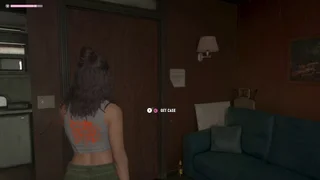
Go to the room for the bathroom interaction once Move to Vice City is active.
Read the message and look for Move to Vice City at the Starlet Motel. Go back to Jason and Lucia's room. Checking Out begins at the interaction in the room, near the bathroom. If the sequence has already started, the map and objective panel switch to the escape. In that state, a missing free-roam marker is expected. Follow the next objective shown on screen.
When the objective tells you to jump to the car, follow the pink marker and close in behind the convertible. Hold the displayed jump button once the motorcycle is in range. Bike-jump footage Restarting from a checkpoint during the chase places you inside Checking Out. To return to Port Gellhorn errands, load your separate save made before the room interaction.
When the phone or marker may be stalled
Rockstar's launch updates include story-call fixes. Compare the version on your console with the official update history before treating a missing phone call as a new bug. Keep a manual slot for the current state. After applying an available update, load that slot and check the same Story list, phone and motel marker. Rechecking the same state tells you more than replaying unrelated activities.
If the map remains empty, note the last completed mission, whether the money objective cleared, which character you control and whether Cal's text arrived. A save from before your last confirmed transition lets you retry a small section. Write down the same information if you contact support. For a game that closes or freezes before you can open the map, use the console crash and launch guide first.
Mission requirements and markers. GTABase Prepare for Vice City · Rare Thief Checking Out · Rockstar launch updates
Sources
Revision history
— Recently updated