
Study 100 unique animals with binoculars and scan 200 base model vehicles with WAiNK. Check Animals and Vehicles in Progress.
Study animals with binoculars and scan vehicles with WAiNK. To reach 100% you need 100 of 255 animals and 200 of 277 base vehicles. Open Progress → Animals or Progress → Vehicles after the action to see what the game added. One scan can identify a tracker and add a base model. Check the collection entry after the scan if you are working toward 100%.
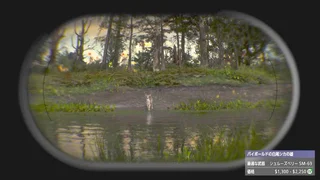
Fill the binocular view with the animal and hold the study button until the prompt completes.
Study an animal with the binoculars
- Select the binoculars from the weapon and equipment wheel with L1 / LB.
- Aim at a clear view of the animal, then use D-pad Up to zoom if needed.
- Hold R1 / RB until the study completes. Keep the animal in frame until the name appears.
- Open Progress → Animals to confirm the named entry.
For the study counter you can leave the animal where you found it. Different dog and cat breeds can count separately, so towns offer more new entries than they might appear to. If a branch or patch of grass obscures the animal, move sideways and reacquire it. For a fish you see underwater, check for a study prompt while diving. The fishing rod is used to catch fish, and the fish guide covers that separate activity. Animal study and breed counts · Routes for common and rare animals
Scan a vehicle with WAiNK
After Cal introduces WAiNK in Unwanted Attention, hold D-pad Up to open the scanner. Point it at the vehicle and hold R1 / RB to scan. Start with a parked car if traffic makes it hard to hold the scan. Scan a boat from the dock or a parked aircraft from the ground.
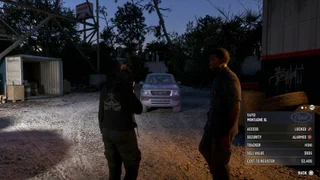
Read the vehicle name on the scan card, then look for it in Progress → Vehicles. Moses walkthrough screenshot
Base Models and Standouts are separate vehicle groups. If a scan returns a named rare variant, check which group took the entry. For the 200 target, move to another area or find the regular model if the base count stays put. Scanning a sculpture or landmark can help the 100 WAiNK locations counter, but it belongs to a different row. Base model and location requirements
Make new entries part of your travel route
| Where you are | What to try on the same trip |
|---|---|
| Key Lento and the Keys | Scan ordinary road cars and shoreline boats. Use your binoculars at the edge of the water. |
| Port Gellhorn | Try a different part of town from the streets you use for Moses. Study unfamiliar cats or dogs near houses. |
| The Grassrivers | Pull off the road when you're near wetlands and get a clear look at wildlife before approaching. |
| Vice City streets and marinas | Go from a residential area to a commercial block and a dock. Scan new cars, then boats from the pier. |
| Airfield access in later free roam | Check parked aircraft that are within safe reach. Keep a waypoint back to the road if access is restricted. |
Check two screens after a mixed route
Before leaving for the waterfront, write down your current Base Models and Animals counts. Scan a boat from the dock, then look through the binoculars at a new bird or another animal along the shore. In Progress, find the boat under Vehicles and the animal under Animals. If you also scanned a landmark, look under Progress → Collections → WAiNK Locations for that entry. Once the 100% screen opens after the story, all three results are displayed as separate counters. Location scan tracking
If the number stays the same
Read the name in Progress before repeating the scan. Two cars can have different colors and the same model entry. Two animals that look similar can have different breeds. When neither scan nor study prompts appear, check that you've unlocked the tool and that the target is within clear view. Once both checklist totals are met, use the 100% checklist to choose the next unfinished counter. If you're collecting beyond the checklist, the vehicle guide can help you choose models to look for next.
Sources
Revision history
— Recently updated