
Check room size, walls and furniture, then arrange NPC neighbors and a pylon network.
To house an NPC, first build a fully enclosed room with background walls, a light source, a flat-surface item, a chair and an entrance, then check it with the housing query. A pylon network also needs qualifying NPCs actually living near the pylons. Housing validity, NPC happiness and pylon usability are three separate checks.
Quick links: Check housing | Adjust happiness | Buy and use pylons | Troubleshooting
Check housing
- Enclose the roof, sides and floor with solid blocks, leaving space for a door. An easy example is 10 tiles wide by 6 tiles high including the frame, for 60 tiles total. This is an easy-to-check example, not the only design.
- Fill the interior background with player-crafted, player-placed walls. Natural cave backgrounds may look like walls but do not necessarily meet safe-wall requirements; fill the background without holes first.
- Place a chair, a table or work bench, and a torch; install a wooden door and leave space for the NPC. The example uses a solid floor. Since 1.4.5 the NPC standing location no longer must be a solid block; older versions still require attention to the standing location.
- Open the inventory, find the housing menu and its “?” query, then click inside the room. If invalid, follow the message to add furniture, enlarge the space or check the background walls. Once valid, you still need a vacant room and an NPC that meets arrival requirements.
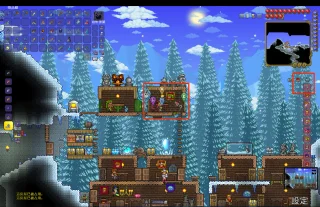
The red box on the right marks the housing query “?” button. Select it and click a room; the result appears at lower left. This example says the room is occupied, so find another vacant one. Image: Terraria beginner guide; permission for public use is unverified.
Outside width: 10 tiles (schematic, not to scale)
■■■■■■■■■■  roof
■ background wall   torch ■
■ background wall table chair door
■ background wall             door
■ background wall             door
■■■■■■■■■■  solid floor
The diagram shows component relationships only; install a door at its actual in-game height. If an NPC does not move in, also check that its arrival conditions are met, a vacant room exists and it is an appropriate time to move.
Version 1.4.5: An NPC meeting arrival conditions may appear homeless even without a vacant room and leave temporarily at night. Provide a valid vacant room to assign a permanent home. Seeing an NPC during the day does not prove the house is valid. For older versions, follow their move-in rules.
Adjust happiness
Talk to a housed NPC and select the happiness dialogue. Note their opinions about the biome, nearby residents and crowding. Start with merchants or crafters you trade with often: move them to a preferred environment, give them suitable neighbors and avoid crowding everyone together. Once they reach their new homes, compare shop prices and dialogue. Change one factor at a time to see its effect.
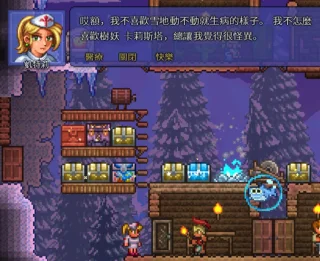
Selecting “Happiness” in an NPC conversation shows opinions of the environment and neighbors. Image: Terraria beginner guide; permission for public use is unverified.
Happiness affects shop prices, but you do not need perfect arrangements before building villages. Give two suitable NPCs valid homes in a new region first, then adjust neighbors. This usually makes a transport network easier than keeping everyone at spawn.
Buy and use pylons
On versions supporting pylons, build homes in the desired biome and assign NPCs. Open the shop of a nearby NPC who can sell pylons and buy the pylon for that biome. Build a second settlement in another region and place another type of pylon. Interact near a placed pylon and choose another available pylon on the map to travel.
For ordinary pylons, check both ends: each must have at least two assigned town NPCs living nearby, be in the matching biome and respect placement limits for each pylon type. The Universal Pylon is an exception to the biome and nearby-NPC requirements.
Version difference: The official wiki records that desktop 1.4.5 removed the minimum happiness threshold for pylon sales; older versions may still require a happier seller. Even in newer versions, NPC count, biome, shop availability and usage conditions still matter. Removal of the happiness sales threshold does not mean teleportation works everywhere.
Troubleshooting
- The shop has no pylon: Check the version, NPC type, actual biome and number of nearby NPCs. In older versions, check happiness too.
- The placed pylon cannot teleport: Check pylon type, biome and whether NPCs have actually arrived near both ends; do not rely only on housing flags.
- The room looks enclosed but is invalid: Use the housing query and recheck background walls, furniture, size and door. In older versions, also check the solid standing tile. If necessary, build the simple rectangle above first and modify it gradually.
Sources
Revision history
— Recently updated